Even while I was writing the article about “Golden axe” I felt the need for a USB joystick similar to that of the Sega Mega Drive console. I had the third part of the game on a cartridge, I also managed to find the second part of the game on a cartridge and bought it from the Internet. I played both of them on my Sega Mega Drive console and had no problems. The first part of the game though… it really annoyed me. It was nowhere to be found on. Nobody had it and nobody was selling it. I was forced to download it on my laptop, but I ran into a new kind of problem – I was not comfortable playing it, because of the mini buttons on the laptop, and the fact that with the laptop, the controls are swapped and the buttons are all messed up. I had to use the right hand for movement with the keyboard arrows, and the left for shooting and jumping, and on a normal Sega (and not only) joystick, things are the other way around – the movement buttons are on the left, and those for jumping and fighting – on the right. Accordingly, I completely sucked at the game and was constantly killed by some pretty dumb and simple opponents – I was a super mediocre player who had no chance of beating even the first boss. I needed a joystick, and one suitable for a computer.
I poked around on aliexpress (which I love by the way, I order stuff from there all the time) and it turns out there is a Sega Mega Drive joystick clone out there with a USB cable and drivers that work with any Windows. O M G. I immediately ordered it and waited about a month for it to arrive.
I placed the order on October 19th. The order arrived on November 20th.
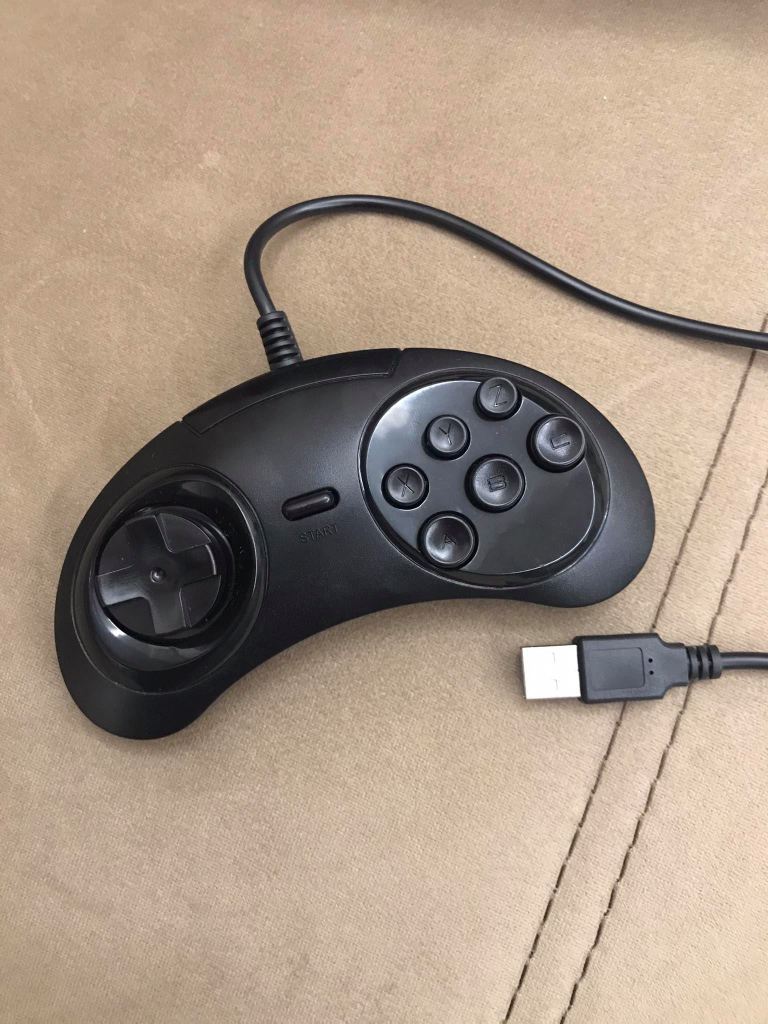
Price was: $3.51 + $0.24 for shipping = $3.75
Here is a link to the joystick in aliexpress: https://www.aliexpress.com/item/33038160702.html?spm=a2g0o.productlist.0.0.43cb37e0a6ux5w&algo_pvid=f0db14ef-c9e4-4647-8ac8-b85c6c2dc48a&algo_expid=f0db14ef-c9e4-4647-8ac8-b85c6c2dc48a-2&btsid=0b0a555516085586766194368e0e56&ws_ab_test=searchweb0_0,searchweb201602_,searchweb201603_
After exactly one month, my joystick arrived, with which I am extremely satisfied. When I first plugged it into my computer, it took a little longer, about 2-3 minutes, for the machine to read it and install its drivers automatically. Since then, this joystick has been my best friend. I turn it on and it works instantly without waiting even 30 seconds.

I managed to learn how to configure the joystick and started playing “Golden axe 1” with pleasure and ease. I beat the game, wrote my article and everything was great. Configuration is actually very easy. Enter the game settings, go to the control settings and start adjusting them. In most games, there is an option for the game to ask you – “now you configure movement to the left, press which button you want this to happen with”, then you press the left joystick button, then the right button, which button will be for jumping, etc.
One day I decided to relax for 15 minutes with a favorite game of mine from my teenage years in high school – “Chicken Invaders Christmas Edition” 🙂 And suddenly it occurred to me – the controls of “Chicken Invaders” are very basic and in theory the limited possibilities of the joystick can cover them completely. I plugged in the joystick and started the game, opened the control configuration options and was able to set them up correctly. Then I started playing and to my great surprise and delight the game started and played nice and easy.

This joystick can be used for any 2D PC game as long as the options allow it. I think it turned out to be a very cheap and successful purchase that will greatly facilitate my gaming experience. A decent and useful tech gadget that I really like.
PC games that I have played with the joystick so far and have no problems using it:
- Chicken Invaders 1
- Chicken Invaders 2
- Chicken Invaders 3 – Revenge of the Yolk
- Chicken Invaders 3 – Christmas edition
- Chicken Invaders 4 – Ultimate omelette
- Chicken Invaders 5 – Cluck of the Dark Side
- Chicken Invaders 5 – Halloween edition
- Golden axe 1
- Golden axe 2
- Golden axe 3
 Technology Realm Resources