I will not write introductions or redundant words. If you want to know a little more about BASIC as a language, why to program in it, where it is used, its history or inventor, etc. then visit my other posts in the BASIC category. Also, if you want to know which programming environment we will use for software development, with which online site we can replace it, as well as with which textbooks and books we will better our BASIC knowledge, then visit this link. If you’re here now, then you want to start programming ASAP, so come on!
In all programming languages, one always starts with the notorious “Hello world” program, or more precisely, with a program that causes the computer to write the sentence “Hello world” on the screen. In BASIC this is done via the “print” command. Open the Just Basic programming environment or the site we will be replacing it with (if you still have questions, visit tutorial number 0, the link is above). Open a new program and type the following code:
print "Hello world"
In the various BASIC textbooks, as well as in the ones we will use, it says that BASIC programming, and more specifically its commands, are done in uppercase letters, but this is no longer mandatory nowadays. At first I felt more retro by writing with Caps lock every program, but at some point my eyes started to get tired and I started to get annoyed by all those awkward letters, so I switched to standard programming – lowercase and camel case in need.
So, after compiling the one-line program that I wrote above, of course, “Hello world” is written on the screen. You notice (I guess) the text is in quotes. Whenever you write text with the print command, you must use these quotation marks. Whatever you write inside them, the compiler doesn’t check or interpret it at all, and it doesn’t go through it, it just takes it and puts it on the screen the same way it is in other programming languages. If you want to write numbers on the screen, you can use the quotation marks again to have what you write be interpreted as text, but you can also just write the number without any extra characters. The two lines of the following program will output the same thing to the screen, namely the number 1966.
print "1966"
print 1966
But if we need to do some calculations, for example to calculate 1966+33, then we will not use quotes, because everything inside them is interpreted as text. See the following example:
print "1966+33"
print 1966+33
The first line of the program will print “1966+33” on the screen without changing it in any way, and the second line will print “1999” because there the numbers and the plus sign are interpreted as what they are – math.

Now is the time to mention about the symbols for basic math functions in BASIC, but it is exactly the same as in other programming languages.
Add +
Subtract –
Multiply *
Divide /
“You should also know that in an arithmetic expression without parentheses, the operations are performed by the computer in order from left to right, with the multiplication and division operations performed before addition and subtraction. If there are parentheses, the operations within them are performed before the others. The parentheses are written in the familiar (from school) way.” [source: “I program at 9 years old”, Narodna prosveta, Petar Stanchev, 1987] Parentheses in BASIC are written like parentheses in mathematics and parentheses in all other programming languages, namely by the characters ( and ).
Let’s write a program that will do all of the above with the numbers 60 and 20. Try it yourself, and then see my code below.

“With print, values of several arithmetic expressions and several texts can be printed. If the separator is a semicolon, the value of the arithmetic expression and the text appear next to each other on the screen; if it is a comma, the computer automatically separates them from each other with intervals”. [source: “I program at 9 years old”, Narodna prosveta, Petar Stanchev, 1987] Let’s also see an example to understand how the dot and the semicolon work when we want to separate or join some text and arithmetic expressions .
Task: Print the following text: “The distance between A and B is “; 80*4; km
Result:

Task: Print the following text: “The distance between C and D is”,80*4,” km”
Result:

SUMMARY: The “print” statement prints some desired message on the screen. If the text is in quotes – it is output in the form in which it is written, if it is not written in quotes – the program considers and treats it either as some code or as an arithmetic expression. When we use a comma (not inside the quotation marks, of course) to separate different numbers or expressions from others, then the program inserts several blank spaces. When we use a semicolon, then the program does not put any space and pastes the text.
So much for this first lesson, keep it light and casual. In BASIC #2 we will continue to delve into BASIC programming. Now you can move on, but I advise you to first complete the tasks that I have come up with to practice the knowledge up to this point, as well as complete the tasks from the textbook “I Programmed at 9 years old”, which I have photographed and placed at the end of this post (sadly, in Bulgarian).
I will end the lesson with a communist slogan (from back in the day, when the BASIC programming language was used in Bulgaria) that is suitable for motivating beginner programmers: Without work, life is neither beautiful nor worthy 😊 So – good luck in your first steps in BASIC programming!
My TASKS:
1.1. Write a program that calculates and displays the result of the following: 20+(80*4)/2+(39+1)-40/10
1.2. Write a program that calculates how much money the 6th graders collected in total for costumes for the school concert. This is them: Ani-30 BGN, Mihail-25 BGN, Ivan-98 BGN, Milena-10 BGN, Ognyan-20 BGN, Vasil-10 BGN.
1.3. Write a program that calculates how many total days the months January, April, June, and December have.
1.4. Write a program that divides the number of days in the month of June by two, then adds five days, and finally divides the whole result by 10.
The tasks from the textbook “I program at 9 years old”:
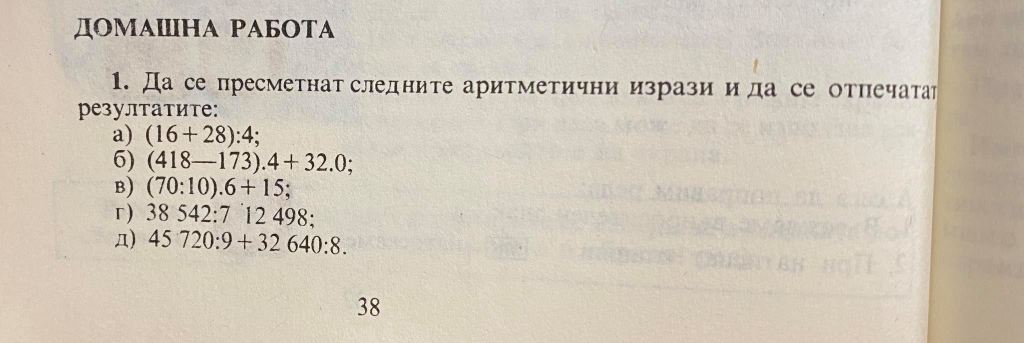
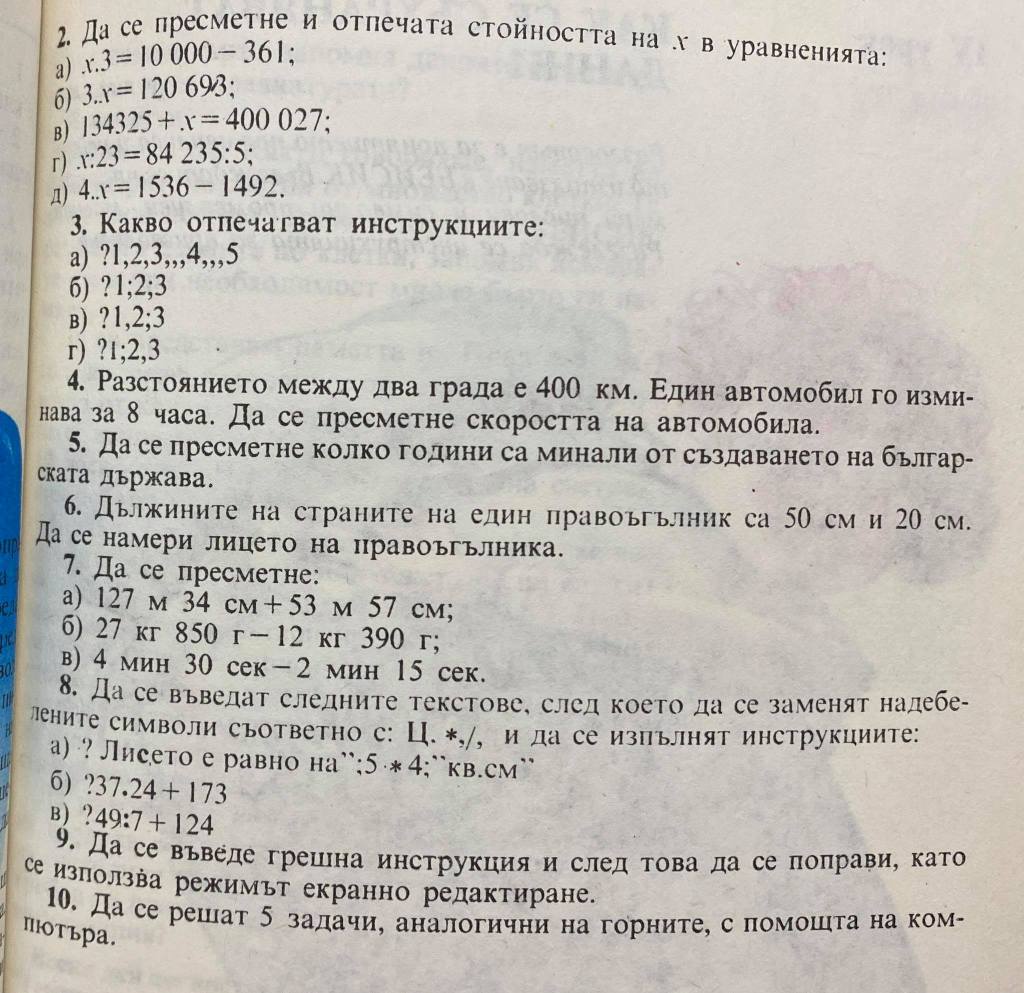
4*** The formula you will need is S=VT where V is the speed km/h, S is the distance and T is the time. We rework the formula for the needs of the task and it starts to look like this –> V=S/T
5*** The creation of Bulgaria took place in the year 681
6*** The formula for finding the area of a rectangle is a*b where a and b are the sides of the rectangle
 Technology Realm Resources
[…] Ако искате да се захванете със същинското БЕЙСИК програмиране, то можете да посетите първия урок от поредицата на ето този линк: https://gerganakarabelyova.wordpress.com/2021/01/29/basic-1-%d1%83%d0%b2%d0%be%d0%b4-%d0%b2-basic-%d… […]
LikeLike