Recently, I came across a new app that instantly went into my mental list of “I need to remember this for school.” I see it working perfectly as a sub plan activity, something for early finishers, and also as an easy, fun way to fill those last 10 minutes of a lesson when everyone’s energy is still high. The app is called Pattern Shapes, and you can download it from the App Store if you’re on iOS, or use it directly in a browser if you’re not. The browser version is exactly the same as the app.
The whole idea of the app is simple and really intuitive: you build pictures using basic shapes like triangles, squares, hexagons. You can change the colors, rotate the shapes, adjust outlines, add text, and play around until everything looks just right. I honestly found it so fun to use that I caught myself making “just one more design” over and over again.
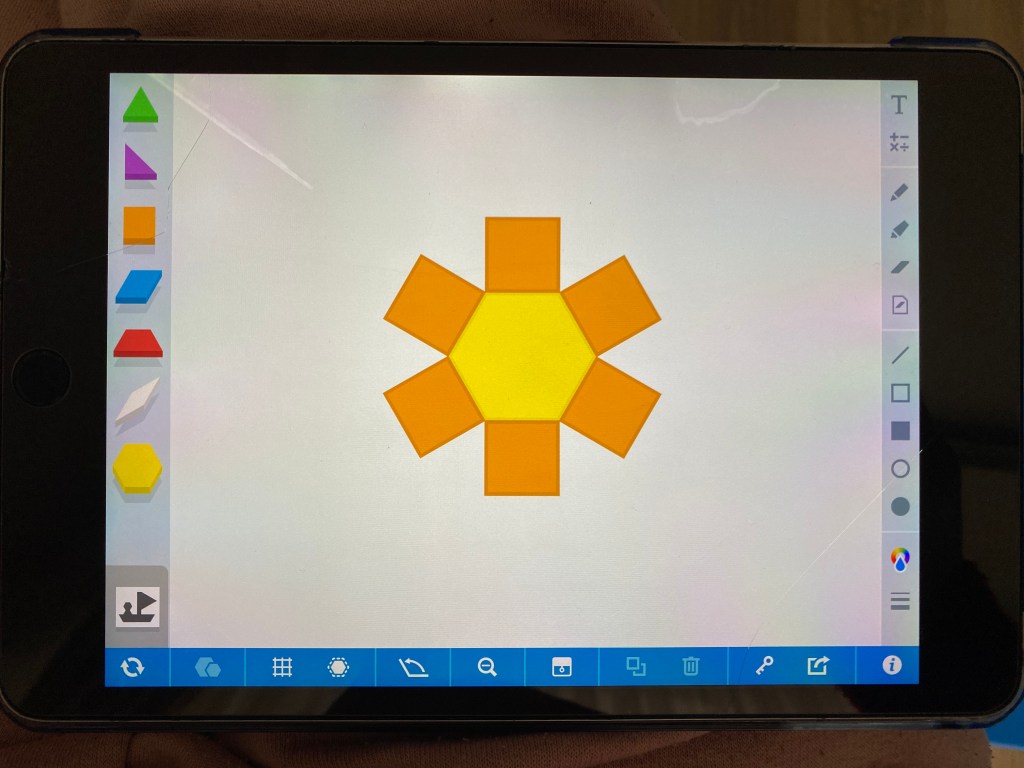
I actually found the app on Instagram, shared by another teacher I follow. I downloaded it right away and made four quick, simple designs to test it out at home, as a Mom, not as a Technology teacher. First, I tried them with my four-year-old son. He surprised me—in the best way. He needed almost no explanation, no help at all, and he managed to copy every single design I made using the app. Then I tried the same activity with my five-year-old daughter, and she did even better. At that point, I knew this was a winner activity.
Both kids asked me to keep going and started giving me instructions like, “Do a bunny, Mom!” We ended up playing for another hour without anyone getting bored. They were working on fine motor skills, learning how to use a touchpad more confidently, and thinking in a very visual, almost geometry-like way—all while having fun. For me, that’s the definition of a win-win.
Because I loved the activity so much and found the interface so playful and easy, I immediately knew I wanted to bring it into my kindergarten classroom. I collected all of the designs I had already made (plus a few new ones) and turned them into a small exercise book. I plan to use it whenever I need to fill the last 10–20 minutes of a lesson, for students who finish early, and I’m definitely keeping a few copies in my sub plan folder—the one I always keep under my desk for those just in case days.
If you like the idea of this activity and want to try it yourself, I’ll upload the exercise book right here so you can download it for free and use it for inspiration in your own classroom. Here it is:
I have tons of such activities at my TpT store – easy to use, zero-prep, fun and engaging Technology activities, for all grades, from Early elementary to Upper Middle Grades! Here’s a link to my TpT store: https://www.teacherspayteachers.com/store/technology-realm-resources if you need anything else! Also, I send free resources to my e-mail subscribers at least once a month, so be sure to sign up there as well, here’s a link: https://mailchi.mp/aa4fdea3280c/technology-realm-resources .
Thank you for reading and I hope my post was helpful!
Grace
 Technology Realm Resources