In this post I will present to you one of my favorite assignments that I have given to students from my Robotics club. This task is easy and fun, and I assign it in one of the first weeks of Robotics lessons (usually the third one), when the students aren’t that good at coding the robots yet and they are just starting to understand and know them better. The activity is closely related to astronomy.
Students attempt to simulate a rocket launch using the Sphero robots. It doesn’t matter exactly which Sphero model is used, as there is no use of the Bolt-specific or RVR-specific sensors in the task, any one will do.
I love this astronomy-related robotics activity so much that I created a video about it (from one of the first times I assigned it to my students). That happened in 2018 and I will never forget it, it was so exciting (and rewarding). It is uploaded to my YouTube channel, just click here to go and see it – “Sphero robot rocket launching into space and visiting other planets – Robotics club 2019” (it’s only 3-4 minutes long).
Preparation
Preparation before class consisted of charging the tablets and robots, of course, but also a few other things.
1. I taped together several pieces of white cardboard to make one narrow and long overall piece, on which I drew the planet Earth and the different layers of the atmosphere that the robot would pass through to reach its end point – the student’s chosen planet.
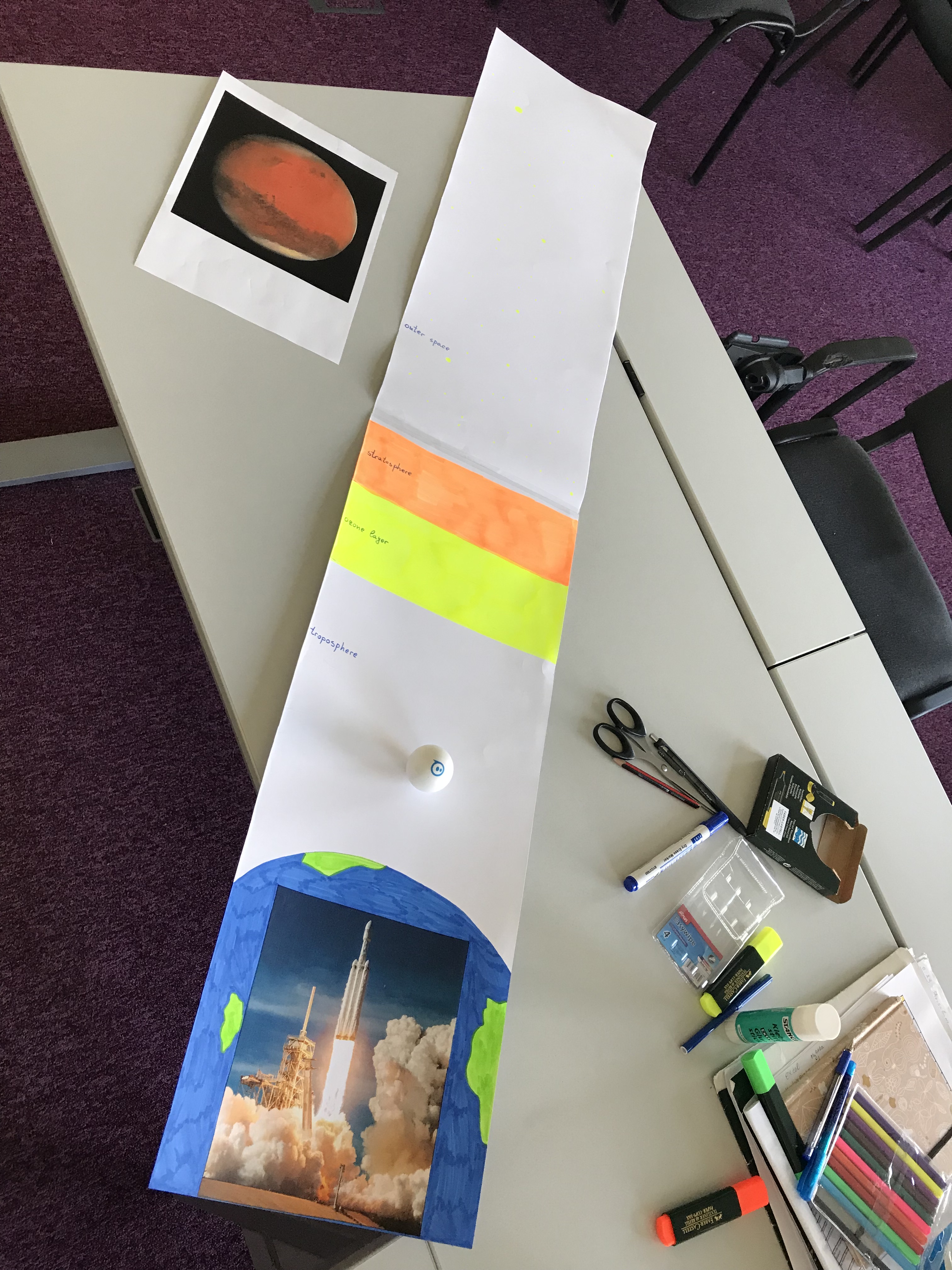
2. I printed (on A4 paper) several planets from our solar system so that each student could choose which planet they wanted their robot to reach. That planet is placed at the end of the the narrow and long drawing from step 1. I also printed the student worksheet with the instructions and the step-by-step guide on how to code the program.
When the lesson starts
When the students arrive, first I show them a cool video of an actual rocket launch. I always use this one, click here.
After this, I explain the task – using a Sphero robot (minis and Bolts is what we have) the students have to write a program that makes the robot mimic a rocket launch from beginning to end. They place their robot on Earth, then their robot goes through every layer of the atmosphere, stops, does something fun and cool (different for each layer) and then reaches the chosen planet.
I also give each student a worksheet with the written task, instructions, a step-by-step guide on how to build the program and a scheme of the different atmosphere layers. They can use the worksheet and the example ideas for the code, or they can be creative and write their own version of the program.
Each program ends with the words “One small step for the Robotics club, one giant step for humankind”.
Example code:
- Countdown 10..9..8..7…….2..1
- Movement from Earth to troposphere
- Stop, red lights, fireworks sound
- Movement to stratosphere, shaking motion (or raw motor block)
- Explosion and launching sounds with orange color
- ……….
- Say block “One small step for the Robotics club, one giant step for humankind”
My students absolutely love this activity. I assign this activity each year with the new Robotics club students on week 3 (week 1 and week 2 are introductory, getting to know the coding blocks and very simple things) so the activity is perfect for ABSOLUTE BEGINNERS.
If you want to do this cool astronomy-related robotics activity with your students, but you don’t feel like creating everything from scratch, there is no need to waste your time. Go to this link (click here) to see and maybe purchase my resource (“Sphero® robot BEGINNER Robotics coding activity Rocket launching step by step”) – premade with everything you may need – teacher notes with instructions, links, tips and advice, student worksheet, step-by-step guide on how to build the program, useful graphics and pictures of all the planets of the solar system (including the Moon).
 Technology Realm Resources