Are you looking for a fun (and cheap) winter activity for the microbit circuit board? Great! Let me help you then, because I have just the right solution that can bring excitement to your classroom, or smiles to your kids at home!

If you want to see the complete project, you can go to my YouTube channel and play the brief video, here is a link: Micro:bit Snowflake Buzzer — Code Jingle Bells | Christmas STEM Tutorial
This is what you will need:
- a snowflake buzzer
- microbit circuit board + its USB cable + the battery cage
- 3 crocodile clip cables

The activity is about using the snowflake buzzer with the BBC micro:bit circuit board, in order to play the “Jingle bells” tune.
First of all, what is a buzzer? It’s an electrical device that generates audible sound, so it’s something like a speaker.

The difference between a buzzer and a speaker is that the buzzer is limited and can usually produce just 1 type of sound, it only needs electricity. The speaker, on the other hand, can produce any kind of sound and doesn’t only need electricity, but also some audio signal.
How to get a buzzer?
Mine I bought from Aliexpress and it was crazy cheap, I paid $2.88, so only a couple of dollars. Just go to aliexpress.com and type “snowflake buzzer” and you will find many options with different prices. I see many options at Amazon and eBay as well.
How to connect it?
The buzzer has 3 pins, with the letters S, G and V. “G” stands for ground, “V” stands for voltage and “S” stands for signal. So, grab the crocodile clip cables and connect the following:
- “G” from the buzzer to the “GND” pin of the microbit
- “V” from the buzzer to the “3V” pin of the microbit
- “S” from the buzzer to pin 0 of the microbit

Coding part
Grab the microbit and its USB cable, connect it to you computer and start coding. You can program any sound sequence, or you can use my version with the “Jingle Bells” tune. Just visit this link to get the full code immediately: https://makecode.microbit.org/_W27acib6j8D3
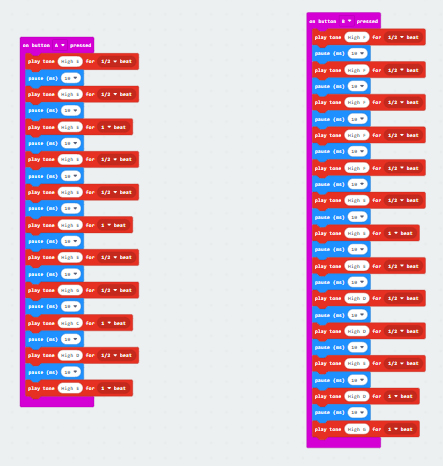
And now you are done! Everything is connected, the code is written and uploaded to the microbit, just play it and have some Christmas fun!

More winter micro:bit coding, no extra hardware needed
The snowflake buzzer is lovely, but it does mean ordering something and waiting for it to arrive. If you want festive micro:bit coding you can run next week with nothing but the boards you already have, I’ve got two options.

For December, there’s Microbit Christmas coding activity and festive challenges show – a set of festive coding challenges that ends with the students showing off what they made. It pairs really well with this buzzer project if you want one lesson that makes noise and one that doesn’t.
And then there’s the January problem. Everything Christmas-themed is dead by the 26th, but you’ve still got two months of winter and students who need something to do. That’s what WinterLANDIA is for – a micro:bit board game that teaches if-else statements and variables, winter-themed but not tied to any holiday, so it works right through February.

If you’d like more projects like this one, I send a weekly e-mail with lesson ideas, freebies and classroom tips – you can join here, and you’ll get the password to my free resource library too.